


.svg)

What server-side tracking can and may do
Server-side tracking explained: how it works, whether it is GDPR-compliant, what drives the costs and when switching pays off for your campaigns.
In short: Server-side tracking moves data collection from your user’s browser to a server of your own that you control. Instead of scripts in the browser talking directly to Google, Meta and the like, the data first passes through your server and is forwarded from there. That makes measurement more resilient to iOS restrictions and ad blockers and gives you more control for the GDPR. Maze & Friends from Vienna sets up server-side tracking with consent management.
If you put budget into Google Ads or Meta and cannot say for sure at the end of the month which campaign brought in leads, you are optimising on incomplete figures. Between iOS tracking protection, ad blockers and the requirements of the GDPR, classic tracking in the browser has become full of holes. Server-side tracking is the answer to that: a technical overhaul of your measurement infrastructure. Here you will find out what is behind it, whether it complies with data protection law, what drives the costs and where the limits are.
What is server-side tracking?
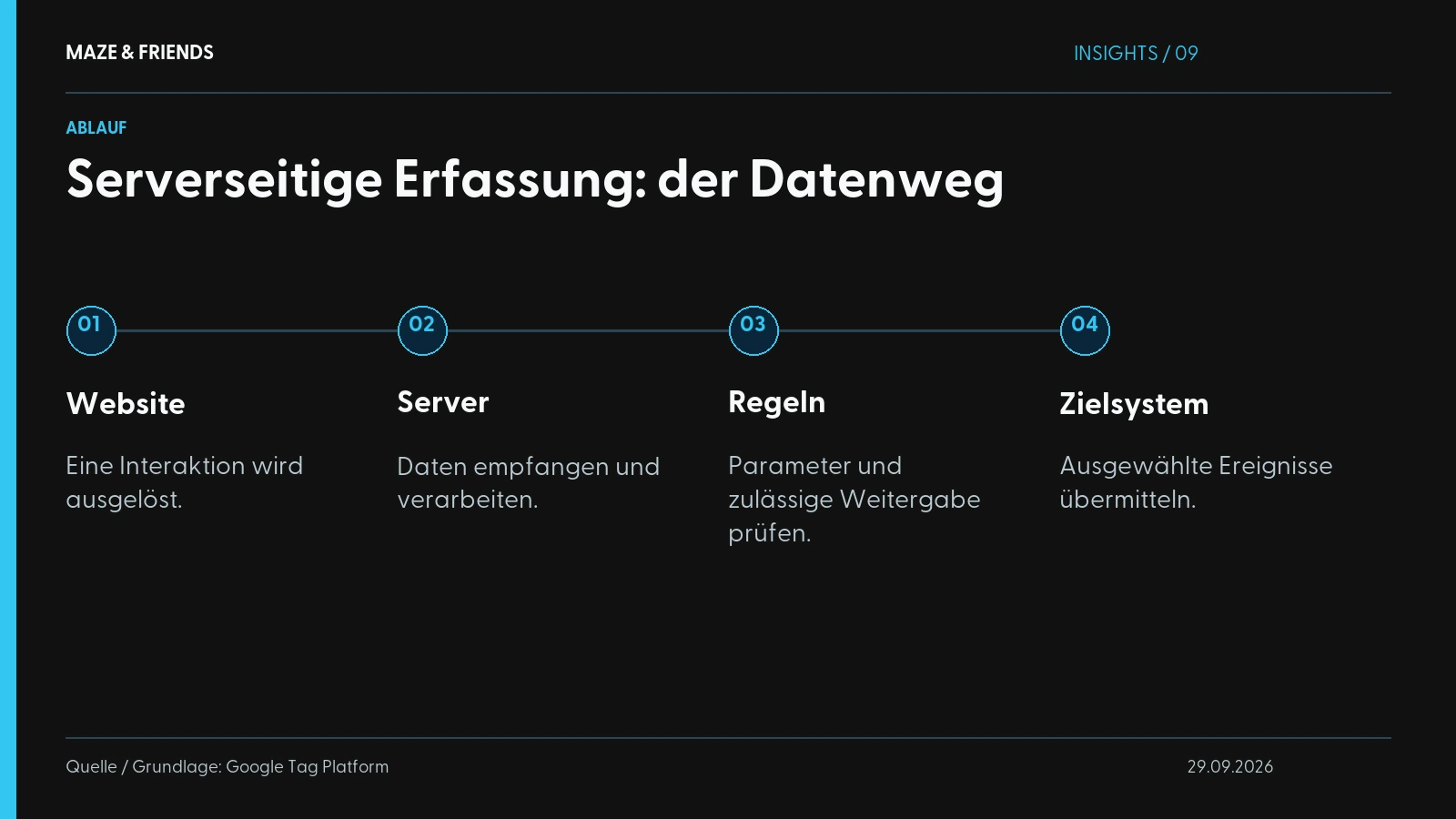
Server-side tracking means that the events on your website, such as a page view, a click or a completed contact form, are no longer sent directly from the browser to Google, Meta or other tools. You send them to a server you own first. Only that server forwards the data.
Technically the difference sounds small, but its effect is large. With classic client-side tracking, your visitor’s browser loads a series of third-party scripts, such as the Google tag, the Meta pixel and perhaps an analytics tool as well. Each of these scripts communicates directly with its provider. The browser is the postman, and anyone can look over its shoulder: ad blockers, browser protection mechanisms, the user themselves.
With server-side tracking, an intermediate station sits between your website and the tools, usually implemented via a server-side Google Tag Manager (sGTM). Your browser only talks to your own server, which takes care of forwarding. That reduces the number of scripts in the browser and often makes your site faster. Above all, though, it takes data sharing out of the direct view of blockers. In its introduction to server-side tagging, Google explains that only you have access to the data in the server container until you pass it on, and recommends running the server under your own domain.
If you want to set up the basics properly first, take a look at our guide to setting up GA4 correctly. Server-side builds on it rather than replacing it.

What is the difference between client-side and server-side tracking?
The difference lies in where the data is collected and processed: in the browser or on your server.
Side by side:
| Aspect | Client-side tracking | Server-side tracking |
|---|---|---|
| Where does the data go? | Straight from the browser to third parties | First to your server, then onwards |
| Ad blockers | Often block scripts completely | Much harder to block |
| iOS / browser protection | Shortens cookie lifetime, blocks trackers | Server can process data more reliably |
| Page load time | Many third-party scripts in the browser | Fewer scripts, often a faster site |
| Control over data | Low, everything flows straight out | High, you filter what goes out |
| GDPR handling | Harder to implement cleanly | More control over data sharing |
| Effort & costs | Low, standard set-up | Higher, server + set-up needed |
Server-side does not completely replace client-side. In practice, a hybrid set-up usually runs: certain signals still need the browser, others go via the server. The skill lies in combining the two sensibly.
One thing above all is gained. With client-side tracking, you depend on the browser playing along. If it does not, because of iOS settings, an ad blocker or strict browser defaults, you lose the event completely. Via the server, you have the chance to process and pass on that signal cleanly anyway, and that is exactly what the set-up delivers in practice.
Is server-side tracking GDPR-compliant?
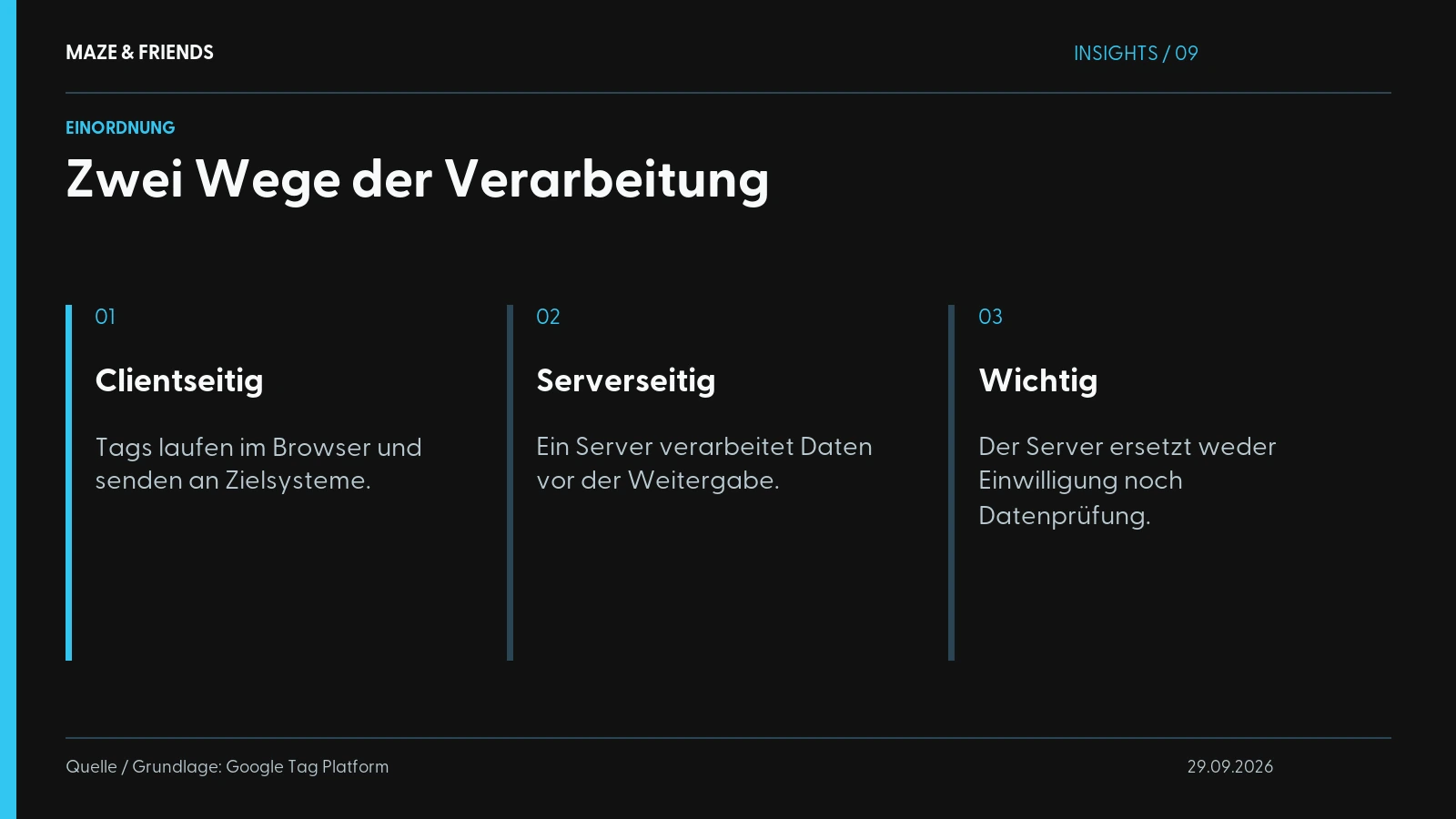
Server-side tracking is not automatically GDPR-compliant. It does, however, give you the tools to make it compliant.
A widespread misconception goes: “If the data runs through my own server, everything automatically complies with data protection law.” That is not quite right. Server-side tracking is a technical method and not a free pass. Whether your set-up is legally sound depends on how you use it.
What actually counts in data protection:
- Consent remains mandatory. Even if data runs through your server, you still need valid consent from your users before you process or pass on personal data. So consent management is a must.
- Sharing data with US providers remains delicate. If your server forwards data to Google or Meta, a transfer still takes place. Recipients and legal basis must be documented properly with server-side too.
- The advantage: more control. This is where the real strength lies. Because the data passes through your server first, you can filter it before it leaves the building: truncate IP addresses, remove sensitive parameters, only let consent-based signals through. Pure client-side tracking does not give you this kind of data sovereignty.
For the DACH market (Germany, Austria and Switzerland), this is the crux. Data protection is a real objection in sales here, especially among industrial mid-sized companies with long decision chains and an active legal department. Server-side tracking gives you the technical foundation to work cleanly. The legal assessment of your specific set-up, however, belongs in the hands of your data protection officer or a specialised lawyer. We do not replace that, and no reputable service provider should promise you otherwise.

How much does server-side tracking cost?
There is no single price, because the costs are made up of several components. At Maze & Friends, the price is set as a fixed quote after the initial call.
These items typically arise:
| Cost block | What is behind it |
|---|---|
| Server hosting | The container for your sGTM runs continuously, usually as a monthly cloud fee depending on traffic volume |
| Set-up (one-off) | Concept, technical implementation, testing, consent integration; the largest one-off item |
| Maintenance & adjustments | Tracking is never “finished”: new campaigns, platform updates, bug fixing |
| Consent management | A tool for consent, often as a separate subscription |
As a rule of thumb: the hosting itself is usually the smaller item. The value and effort lie in a clean set-up. A badly configured server-side set-up measures just as wrongly as a patchy client-side set-up, only more expensively. Anyone selling you server-side tracking as a pure hosting product is telling you half the truth.
And who is it worth the effort for? The more budget you put into paid channels, the faster the investment pays off. If inaccurate data leads you to switch off a working campaign or invest in the wrong one, that costs you more than the set-up. With small budgets and no significant paid share, the benefit is limited. In that case, you are better off setting up your conversion tracking properly first and switching to server-side later.
How do you set up server-side tracking?
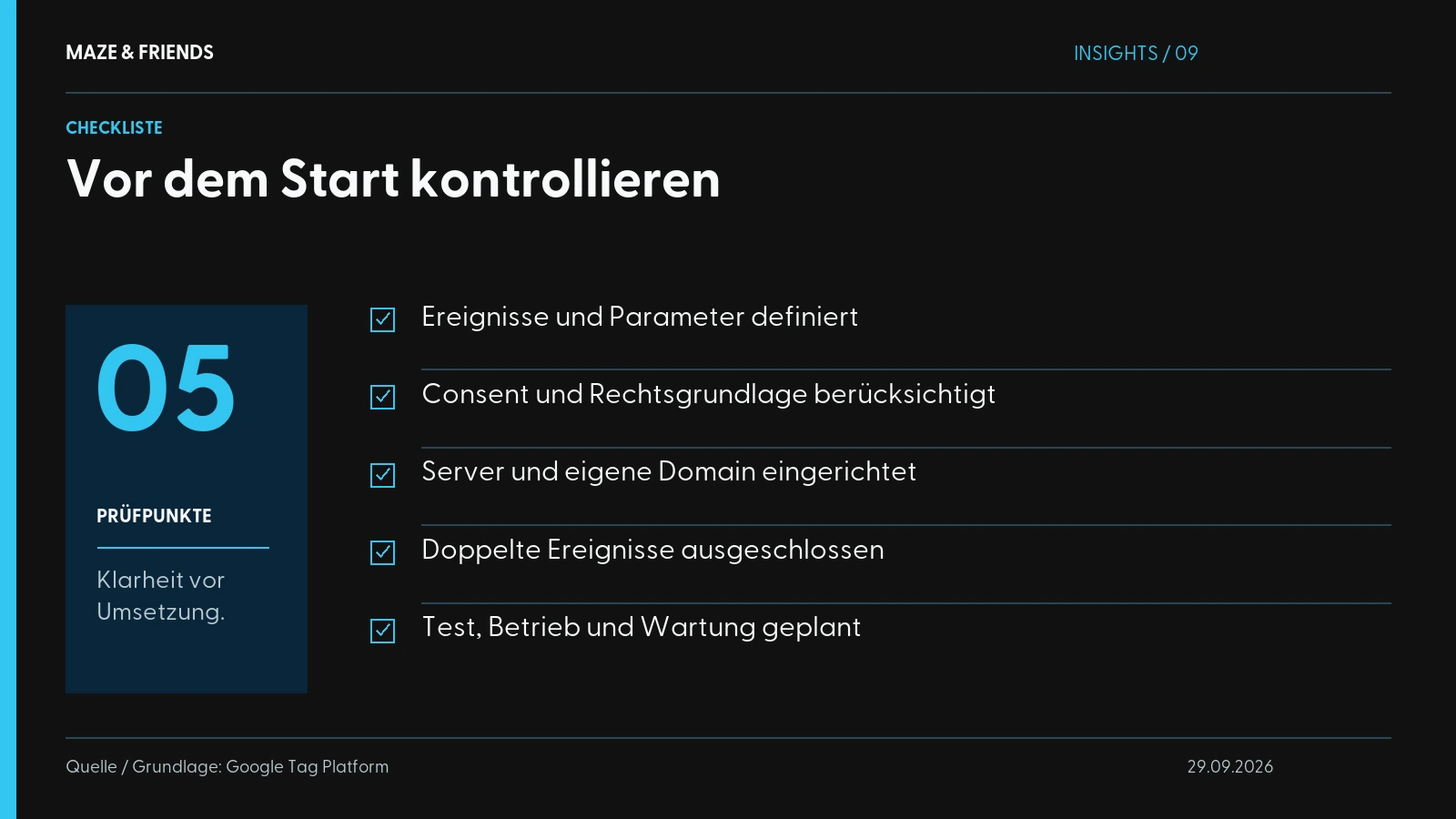
In practice, a clean set-up comes together in five steps. This is deliberately not a click-by-click tutorial, because every set-up is individual. See it as a map, so you know what to watch out for.
- Stocktake. What are you measuring at the moment, which events are business-critical, which tools are connected? Without this step, you are building on sand.
- Set up the server. The server-side Google Tag Manager needs its own environment, usually in a cloud, often under a dedicated subdomain of your website. Thanks to this subdomain, data sharing technically counts as “first-party” and works more reliably.
- Consent first. Consent is built in from the start. Bolting it on afterwards does not work. Only what the user allows gets processed.
- Connect the events. Your important signals, such as a form, an enquiry or a download, are sent from the browser to the server and from there to the target tools. For Meta, this runs via the Conversions API (CAPI), for Google via the corresponding interfaces. If the Meta pixel runs in parallel, every event needs the same event ID and the same name in both paths, as stated in Meta’s guide to deduplicating pixel and server events.
- Test, test, test. Most people underestimate this part. For every event, you check whether it really arrives, counts only once and respects consent. Only when that is in place is the set-up ready to go live.
Step 5 is where set-ups fail most often. A server-side build that has not been thoroughly tested gives you a deceptive sense of clean data and may measure worse than before. “It runs” does not mean “it’s right”.
Clean tracking is a craft
If you are investing seriously in paid channels, server-side tracking is part of the picture today. It is the technical answer to a reality in which browsers, iOS and data protection hollow out your browser-based measurement piece by piece. Even so, it is no magic product. It makes your data neither automatically GDPR-compliant nor automatically better. What makes the difference is a clean set-up and thorough testing, in other words craft.
Maze & Friends sets up GA4, server-side tracking, the Conversions API and consent management so that you can trust your figures again. If you then want to keep working on implementation, take a look at conversion optimisation without buzzwords, because measuring is only the first step.
Want to know whether server-side tracking pays off for your set-up and where exactly you are losing data? Then let us take a look in a no-obligation initial call.
From the studio: Canal Toys: shop, guides and campaigns · kiwiz: content plan and social ads.
Frequently asked questions
What does server-side tracking mean in simple terms?
Server-side tracking means that events from your website go to a server of your own first and only then on to Google, Meta and the like.
With classic client-side tracking, your visitors’ browser sends the data directly to each provider. With the server-side route, the browser only talks to your server, usually a server-side Google Tag Manager under a subdomain of your website. You decide which data is passed on and in what form. And measurement becomes more resilient to ad blockers and browser protection.
Client-side or server-side tracking: which is better?
Server-side tracking is more reliable and gives you more control. It does not completely replace tracking in the browser, though; in practice a hybrid set-up usually runs.
Client-side tracking is cheap and quick to set up, but loses signals to ad blockers, iOS and strict browser settings. Server-side costs hosting and set-up, but in return processes events more reliably and filters data before it is passed on. Many signals still originate in the browser and are merely forwarded via the server. The more budget you put into paid channels, the more likely the server-side part is to pay off.
What does tracking mean and what types are there?
Tracking literally means following a trail. In online marketing, it means recording and analysing the actions of website visitors, such as page views, clicks or enquiries.
- Client-side: scripts and pixels in the browser send directly to the providers
- Server-side: data passes through your own server first
- Hybrid: the combination of both routes, the standard in practice
- Server-to-server: interfaces such as Meta’s Conversions API report events directly from your system
By purpose, you distinguish between web analytics, for example with GA4 or Matomo, and conversion tracking for advertising platforms.
Does server-side tracking make my tracking automatically GDPR-compliant?
No. It does, however, give you the technical tools to implement data protection properly.
The advantage is control. Because all data passes through your server first, you can truncate IP addresses, remove sensitive parameters and pass on only consent-based signals. If your server forwards data to Google or Meta, a transfer still takes place. With US providers that remains delicate, and recipients along with the legal basis must be documented. The legal assessment of your set-up belongs with your data protection officer or a specialised law firm.
Can I do without the cookie banner if I use server-side tracking?
No, as a rule you still need consent management. Whether data runs through the browser or your server makes no difference to the consent requirement.
The server has to receive the consent status from the banner and forward only events that are permitted. With Google tags, Consent Mode passes the signals through to the server container; for other destinations such as Meta, you usually set up the check yourself. Test specifically that no data goes to advertising platforms when consent is refused. The server is no way around the banner either.
Which providers of server-side tracking are there?
There is the self-hosted server-side Google Tag Manager in Google Cloud, hosts such as Stape or TAGGRS, and platforms such as JENTIS.
For web analytics without Google, Matomo can also be run on your own servers and fed with data server-side. More important than the name are three questions: where are the servers located, who has access to the data, and how well can the set-up be connected to your consent management? Before deciding, ask to see the server location and the data processing agreement.
What costs should I expect for server-side tracking?
Ongoing server hosting, a one-off set-up, ongoing maintenance and usually a consent tool. There is no standard price.
Hosting depends on traffic volume and is usually the smaller item. The largest one-off item is the set-up with concept, technical implementation, consent integration and tests. If you have the know-how for Tag Manager and cloud in-house, you save on implementation. You save nothing on testing. A badly configured set-up measures just as wrongly as before, only more expensively.
Who is server-side tracking worth it for?
Above all if you invest significant budget in Google Ads or Meta and your measurement has noticeable gaps.
Gaps arise from iOS, ad blockers or refused consent. The bigger the advertising budget, the faster the overhaul pays off, because incomplete data leads to wrong budget decisions, such as switching off a campaign that actually works. With small budgets and no significant paid share, the benefit is limited. In that case, you are better off setting up your conversion tracking in the browser properly first and adding the server-side layer later.
Is server-side tracking the same as Meta’s Conversions API?
No. The Conversions API (CAPI) is Meta’s interface for server-side events; server-side tracking is the overarching approach that serves such interfaces.
A server-side set-up sends the same events to several destinations, for example to Meta via CAPI and to GA4 and Google Ads via Google’s interfaces. The CAPI is therefore one building block. If the Meta pixel runs in the browser in parallel, both paths need a shared event ID, so that Meta does not count purchases and leads twice.
How does server-side tracking work with Google Tag Manager?
With two containers: the web container in the browser captures events, the server container receives and distributes them.
In the server container, so-called clients accept the incoming requests, for example in GA4 format, and tags forward the data to destinations such as GA4, Google Ads or Meta’s Conversions API. In between, you can check, truncate or enrich data. The server container runs in a cloud or with a host, reachable under a subdomain of your website, so that communication runs in the name of your own domain (first-party).
Does server-side tracking get around ad blockers and Safari’s tracking protection?
It makes your measurement considerably more resilient to ad blockers and browser protection such as Safari’s Intelligent Tracking Prevention (ITP). It cannot get around them completely.
Because the browser talks to a subdomain of your website, fewer requests are blocked, and cookies from the first-party context often last longer. The web container, however, still runs in the browser and can be blocked just the same. Measuring more reliably also never means overriding refusals in the cookie banner. Server-side only recovers lost signals where consent has been given.
Will server-side tracking make my website faster?
Often yes, because fewer third-party scripts have to load in your visitors’ browser.
How big the effect is depends on how many tools you move to the server and how lean your previous set-up was. A web container for data collection usually remains, so you cannot do entirely without a script in the browser. Load time is therefore not much of a reason on its own for the overhaul, but it is a welcome side effect. Measure load times before and after the switch rather than relying on promises.
How long does it take to set up server-side tracking?
That depends on the number of events, the connected tools and your consent set-up. There is no reliable blanket figure.
A manageable set-up with few events and one advertising channel goes live faster than a set-up that has grown over years with many tools and special cases. In the end, the testing phase determines the schedule. The set-up is only finished when every event arrives, counts only once and respects consent. Plan time for checks after going live too, because new campaigns and platform updates keep bringing adjustments.
How can I tell that my server-side tracking is working properly?
When every business-critical event arrives exactly once in every target system and nothing is forwarded when consent is refused.
- Preview mode of the server container in Tag Manager
- DebugView in GA4
- Test tool in Meta Events Manager
- Comparison with enquiries or purchases in your CRM or shop
If your figures shift after the switch, that is normal, because you are now measuring more accurately. Inexplicable jumps, on the other hand, point to double counting or missing deduplication.
How can I track website visitors?
With an analytics tool such as GA4 or Matomo, integrated via a tag manager and only active after consent in the cookie banner.
First decide which actions count, such as an enquiry, a download or a purchase, and measure them as separate events. For advertising channels, add the Google Ads tags and the Meta pixel. If you are noticeably losing signals to blockers and browser protection and a lot of budget goes into ads, add a server-side layer. The order matters: consent and goals first, tools afterwards.
Next step
Want to know which of this fits your company? We will work it out together in 30 minutes. Free and without obligation.
Pick a time
Manuel Zellnig has been building visibility for companies since 2018: brand film, personal branding, performance marketing and AI visibility. Qualified advertising specialist (Werbeakademie Wien), Bachelor in Business Management (Carinthia University of Applied Sciences), author of the book ‘Mobile Apps zur Messung der Kundenzufriedenheit’ (2017, in German) and creative expert for the Austrian Economic Chamber (WKO) in two transformation guides. He measures before he recommends and writes here about what actually works in projects.
Publications and interviews: WKO transformation guide for printers (in German) · WKO transformation guide for florists (in German) · Interview with Ghezzo (in German) · ‘Heute’ on Viennese start-ups (in German)